
MarketMuse is a powerful tool for content teams. The platform uses AI to analyze your content and compare it against top-ranking pages, helping you create comprehensive content briefs and optimize existing articles.
It’s particularly strong at topical modeling and understanding content depth.
But here’s where MarketMuse loses solo creators and writers:
The pricing cliff is brutal. You get a free plan with 10 queries per month. That’s fine for testing. But the moment you need more, you’re jumping to $99/month for the Optimize plan. Want the full feature set? That’s a minimum of $249/month for the Research plan. When you’re a solo marketer billing $3,000 monthly, spending $250+ on one tool deserves a second look.
The learning curve is steep. MarketMuse throws a ton of data at you. Multiple reports, proprietary metrics (Personalized Difficulty, Topic Authority, Content Score), endless keyword suggestions. If you’re trying to research, write, edit, and publish content yourself, you don’t have weeks to master a complex tool. You need something that works today.
Too many features you don’t need. MarketMuse has evolved into an enterprise content strategy platform. It includes site-wide inventory crawls, competitive analysis, content planning, topic clustering, and AI content generation.
If you’re a content team looking to scale content production across dozens of sites, these features make sense. But if you’re writing 5-15 blog posts a month for yourself or a handful of clients, you’re paying for features you’ll never touch.
Reports require interpretation. Unlike tools that only give you a simple content score and actionable suggestions, MarketMuse sometimes makes you dig through data.
You’ll run a Research report, a Compete report, maybe an Optimize report, and then piece together insights across multiple screens. The data is high-quality, but extracting actionable steps takes time and SEO knowledge you might not have.
It’s overkill for your workflow. You don’t need to crawl and inventory your entire site. Neither do you need cluster-level content plans. What you need is to know what to write, how to optimize it, and then move on to the next article.
These aren’t deal-breakers if you’re managing 50+ articles monthly with a team. But for solo creators and tiny teams, there are simpler tools that deliver 80% of the value at a fraction of the cost and complexity.
What to Look for in a MarketMuse Alternative
Before you commit to a new content optimization tool, here’s what matters:
Real-time content scoring. The best alternatives give you live feedback as you write. Your content score updates with every sentence, showing you exactly when you’ve hit the target.
On-page optimization features. Look for tools that help you create comprehensive content that covers topics thoroughly, not just keyword stuffing.
Transparent pricing. Look for tools with clear pricing tiers that scale gradually. Avoid platforms where you pay $99/month and then suddenly jump to $600/month with nothing in between.
Learning curve you can handle. If you’re not an SEO expert, pick a tool that’s intuitive from day one. You shouldn’t need a week of tutorials to write your first optimized article.
Integration with your workflow. Does it work with Google Docs? WordPress? Can you export briefs if you intend to pass them on to contractors or other writers? The best tools fit into your existing process instead of forcing you to adapt.
Accurate SERP analysis. These seo tools reverse-engineer top-ranking pages to identify content gaps and opportunities. But accuracy varies wildly. The best platforms analyze the various search engine ranking factors. Budget tools might only look at keyword density and word count.
Fair credit systems. Most alternatives use credit-based pricing (one content brief = one credit). Check whether unused credits roll over, whether you can buy more credits mid-month, and what happens if you exceed your limit.
The 8 Best MarketMuse Alternatives for Solo Creators
Platform Comparison Table
| Platform | Starting Price | Content Editor | Scoring System | AI Writing | Best For | Learning Curve |
|---|---|---|---|---|---|---|
| Frase | $39/month | Real-time | 0-100 percentage + GEO score | Yes | Speed & budget | Easy |
| Surfer | $49/month | Real-time | 1-100 numerical | Yes | Best workflow | Easy |
| NeuronWriter | $19.12/month | Real-time | 1-100 with color coding | Yes | European markets & value | Easy |
| GrowthBar | $29/month | Basic | Simple indicators | Yes | Tight budgets | Easy |
| Clearscope | $129/month | Real-time | Letter grades (F to A++) | Yes | Premium UX | Easy |
| Originality.AI | Free | Basic | Simple highlights | No | Zero budget | Very easy |
| Semrush WA | $248.17/month* | Real-time | Basic scoring | Yes | Existing Semrush users | Easy |
| Content Harmony | $42/month | Grading only | Report-based | No | Brief creation | Medium |
*Requires a full Semrush subscription.
1. Frase
Best for: Solo creators who need speed and affordability

Frase combines content research, brief generation, optimization, and AI writing in one platform.
While competitors take 2-5 minutes to analyze SERPs, Frase pulls outlines almost instantly. You can research a topic, build a brief, and start writing optimized content without switching tools.

The editor uses a clean, document-style layout with a sidebar. Your topic score appears as a percentage (0-100%) in the top-right corner of the screen under “Quality Scores.”
In 2025, Frase added GEO (Generative Engine Optimization) scoring alongside SEO scoring, so you see two scores: one for traditional search (based on topic coverage and content structure) and one for AI platforms like ChatGPT (based on Authority, Readability, and Structure).
Recommended keywords are listed under the Quality Scores section with checkmarks appearing as you use them.
Integrations include a WordPress plugin, Zapier for automation, and a full API for custom workflows.
Frase pros:
- Fast brief generation
- All-in-one platform for research, briefs, optimization, and writing
- Most affordable for full features
- Simple pricing
- GEO scoring for AI search optimization
Frase cons:
- A smaller team means slower feature development
- AI writing quality varies by topic
- The interface can feel cramped with many features on one screen
- Starter: $39/month (10 articles and basic SEO research, etc.)
- Professional: $103/month (30 articles, content calendar, internal linking suggestions, etc.)
- Scale: $239/month (100 articles/month, 5 seats, auto internal linking, etc.)
This is the pricing when billed annually.
Who should use it: This is your best bet if you’re handling everything yourself. The $39/month Starter plan works for testing. The $103/month Professional plan covers most freelance writers who write 10-30 articles per month. You get research, optimization, and AI writing in one tool without juggling multiple subscriptions.
2. Surfer
Best for: Solo creators who want the best content workflow

Surfer analyzes top-ranking pages and generates content briefs with specific recommendations. The Content Editor is probably the cleanest in the industry. You write in the main panel (looks like Google Docs), and the right sidebar shows your Content Score as a big number from 1-100.
Under 33 means not optimized, 33-70 is decent, over 70 means it’s “good enough” to publish. The algorithm weighs natural term usage, content structure, readability, and search intent matching rather than obsessing over word count.
Below the content score, you get Guidelines with suggestions for terms to use in your article body and headings. Terms turn green when you’ve used them enough, yellow if you need more, and red if you’re overdoing it.
There’s also the Auto-optimize feature. Click one button and Surfer automatically inserts missing keywords where they make sense. It’s not perfect (you’ll want to review), but it can boost your score by 10-15 points in seconds.
The Topical Map feature helps you plan content clusters, which is rare at this price point.
Integration-wise, Surfer is best-in-class. Direct Google Docs integration writes optimization suggestions right in your Doc. You also get a WordPress plugin, Jasper integration, Google Search Console, and webhooks. If you write in Google Docs, you never have to leave your Doc.
Surfer pros:
- Clean interface
- Real-time scoring updates as you type
- Auto-optimize boosts scores in seconds
- Best Google Docs integration
- Topical maps for content planning
- Active development with regular updates
Surfer cons:
- More expensive than Frase or NeuronWriter
- Credits don’t roll over month to month
- It can feel limiting if you need 40+ articles monthly
- AI writing costs extra credits
- No free trial
- Discovery: $49/month (annual). You can use it to create or optimize 120 documents
- Standard: $99/month (annual). You get to create or optimize 360 articles, integrate with WordPress and Google Docs, access Plagiarism Checker, etc
- Pro: $182/month (annual). Everything in the Standard plan plus one-click internal linking, unlimited docs, advanced SERP analysis, etc
Who should use it: Solo creators with consistent income who want the best tool available. The Discovery and Standard plans cover 360 articles, which is more than enough for most freelancers managing 3-5 client blogs. If you write in Google Docs, this is probably your best option.
3. NeuronWriter
Best for: Solo creators who want powerful features at a fair price

NeuronWriter analyzes the top 30 competing pages for your keyword and uses NLP to extract semantically relevant terms. The editor feels like a mix between Google Docs and Surfer.
Your Content Score appears prominently at the top (1-100), along with your top competitor’s score for comparison.
Like other tools, NeuronWriter uses a color-grading system to indicate the terms you’ve used. Green means you’ve used a term enough, gray means you haven’t used it yet, yellow means you’re using it a bit too much, and red means you’re overusing it.
The right sidebar also shows tabs for Ideas (competitor headings and People Also Ask questions) and YT (YouTube videos related to your topic for research).
NeuronWriter is particularly strong in European markets and supports 170+ languages, making it the go-to for international SEO.
The Content Designer feature can generate full articles with one click. The built-in plagiarism checker saves you from having to use Copyscape. The tool also automatically suggests internal linking opportunities.
Integrations include WordPress, Google Search Console, Chrome extension, and a full API. On Gold plans and higher, you can bring your own OpenAI API key to bypass AI credit limits entirely.
NeuronWriter pros:
- Affordable pricing
- Intuitive color-coded optimization system
- Supports 170+ languages (best for international SEO)
- Built-in plagiarism checker
- One-click article generation
- Internal linking suggestions
- Can use your own OpenAI key on higher plans
- Both SEO and AI scoring
NeuronWriter cons:
- Interface feels less polished than other content tools
- Smaller user base than established competitors
- Some features feel overwhelming for beginners
- AI article quality varies
- Bronze: $19.12/month (annual) — 2 projects, 25 analyses, 15,000 AI credits
- Silver: $37.12/month (annual) — 5 projects, 50 analyses, 30,000 AI credits
- Gold: $57.12/month (annual) — 10 projects, 75 analyses, advanced templates, WordPress/GSC integration, API access
- Platinum: $77.12/month (annual) — Everything in the Gold plan plus 25 projects, 100 analyses
- Diamond: $97.12/month (annual) — Everything in the Platinum plan plus 50 projects, 150 analyses
Who should use it: Solo creators who want Surfer-level features at Frase-level pricing. If you work in non-English markets, this is your best option. The Silver plan ($37.12/month annual) matches Frase Basic’s price but includes more projects and the plagiarism checker. Good choice if you’re publishing 20-50 articles monthly and want a professional tool without the Surfer price tag.
4. GrowthBar
Best for: Budget-conscious solopreneurs
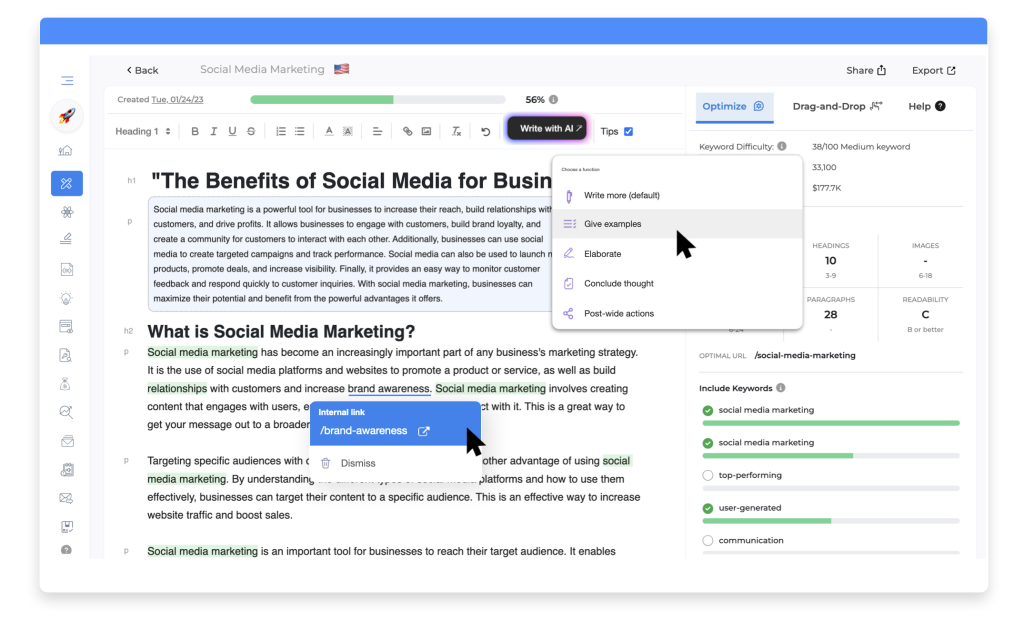
GrowthBar started as a Chrome extension for keyword research but evolved into a full content optimization platform. It keeps things simple. The editor is basic (think early Google Docs), and optimization suggestions appear as you write.
You don’t get a fancy numerical score like Surfer. Instead, GrowthBar shows green checkmarks when you’ve covered important topics and highlights missing keywords.
The Chrome extension adds a quick sidebar to Google search results showing keyword data, which is handy for research. You’ll write in GrowthBar’s editor and copy-paste to your CMS since there’s no direct WordPress or Google Docs integration.
GrowthBar’s Standard plan starts from $29/month when billed annually. On this plan, you get keyword research, content optimization, AI writing, competitor analysis, and backlink data.
Most tools charge separately for these features. This simplicity is GrowthBar’s strength. There’s no learning curve. You can start optimizing content within minutes of signing up.
GrowthBar pros:
- Most affordable with AI writing included
- AI incorporates SEO suggestions automatically
- Chrome extension for quick research
- Simple interface
- Includes backlink and competitor analysis
GrowthBar cons:
- Less sophisticated than Surfer or Clearscope
- Newer platform
- No direct CMS integration
- AI content quality varies
When billed annually,
- Standard plan: $29/month, for 25 AI content outlines, 500 AI paragraph generations, unlimited keyword research, etc
- Pro plan: $79/month, for 100 AI content outlines, 2000 AI paragraph generations, unlimited keyword research, etc
- Agency plan: 129/month, for 300 AI content outlines, 5000 AI paragraph generations, unlimited keyword research, etc
Who should use it: Solopreneurs and tiny teams who need “good enough” optimization at a low price point. If you’re just getting started with content marketing and can’t justify $79-99/month yet, GrowthBar delivers solid value.
5. Clearscope
Best for: Solo creators with a budget who prioritize ease of use

Clearscope wins on polish. The editor is gorgeous and minimal. Your content grade is prominently displayed at the top using letter grades (F to A++). Below that, you see word count vs. typical word count, and readability score.
The right sidebar shows recommended terms with a “Typical uses” metric, alongside how many times you’ve used the term. As you use each term, Clearscope adds a green checkmark.
Most people aim for A- or better. The grade reflects how comprehensively you’ve covered the topic compared to top-ranking content. The algorithm analyzes term frequency, semantic relevance, content depth, and topical coverage.
Clearscope tends to give lower grades than Surfer’s numerical scores (a Clearscope B+ might correspond to a Surfer 75), which motivates you to add more content.
Recently, Clearscope released a ton of AI features that can help you create content and track your content performance.
SEO is evolving & LLM visibility is the new frontier.@Clearscope just launched game-changing AEO features: AI drafting, topic clustering, and AI search visibility tracking that measures brand share of voice.
— Maddy Osman (French) (@MaddyOsman) October 1, 2025
Get $30/month off for 6 months: https://t.co/GpcfhHFh2S #affiliate pic.twitter.com/bAfzdVB5SX
Clearscope also integrates with WordPress, Microsoft Word, and Google Search Console for content inventory.
Clearscope pros:
- Most polished interface
- Letter grade system is intuitive and motivating
- Best-in-class Google Docs integration
- High-quality keyword recommendations
- Content monitoring tracks performance
- Excellent customer support
- Term importance weighting
Clearscope cons:
- Most expensive option in this list
- Limited keyword research abilities
- Essentials plan: $129/month for 20 AI tracked topics, 20 monthly topic explorations, etc
- Business plan: $399/month for 50 AI tracked topics, 50 monthly topic explorations, etc
- Enterprise plan: Custom pricing
Who should use it: If you’re willing to pay premium prices for premium UX and you write high-value content ($1,000+ per article), Clearscope is worth it. The ease of use saves time, and time is money when you’re solo.
6. Originality.AI Content Optimizer (Free)
Best for: Writers on zero budget

Originality.AI’s content optimizer is completely free with no usage limits. Enter your target keyword and either your content URL or paste your text. After analysis (takes 15-30 seconds), you see a list of keywords with color coding: green means you’re using it the right amount, orange means use it less, red means you’re overdoing it.
This content optimization tool is part of Originality.AI’s broader suite (they’re known for AI content detection), so you can check your content for AI patterns in the same interface.
Originality.AI pros:
- Completely free
- No usage limits
- Simple interface
- Highlights the top 5 keywords clearly
- Part of a broader AI detection tool suite
Originality.AI cons:
- No real-time editor
- Basic functionality only
- No AI writing features
- No content briefs or planning
- Color-coded feedback is less actionable than numerical scores
Originality.AI pricing:
- Free
Who should use it: Solo bloggers or anyone starting who can’t afford paid tools yet. It won’t match the sophistication of tools like MarketMuse or Clearscope, but it’s genuinely useful and costs nothing.
7. Semrush Writing Assistant
Best for: Solo creators already using Semrush for SEO

If you’re already paying for Semrush, the Writing Assistant is included. It works as a plugin for Google Docs and WordPress, showing a sidebar with your SEO score (a simple numerical indicator), readability level, tone analysis (formal/casual), and originality check.
It’s clean but feels less feature-rich than dedicated tools. The keyword list shows target keywords with usage counts.
Semrush gives you a simple optimization score (low/average/high) rather than a precise number. It’s less granular than Surfer’s 1-100 scale. You’ll see indicators like “SEO: 7.8/10” and “Readability: 8.2/10,” but the scoring system is less sophisticated than dedicated optimization tools.
The tone analysis feature (formal/casual/confident) is unique. The originality check catches duplicate content. Since you’re already using Semrush, you can pull keyword data directly from your Semrush keyword research into the Writing Assistant. It leverages Semrush’s massive keyword database, ensuring comprehensive keyword suggestions.
Semrush Writing Assistant pros:
- Included with a Semrush subscription
- Integrates with Google Docs and WordPress
- Covers basics well (keywords, readability, tone)
- Leverages a massive keyword database
- Tone analysis is unique
- Originality check included
Semrush Writing Assistant cons:
- Less sophisticated than dedicated tools
- Basic scoring
- Requires an expensive Semrush subscription
- Feels like an add-on, not a core product
Semrush Writing Assistant pricing:
- Included with Semrush Pro+ ($248.17/month), Guru ($455.67/month), when billed annually.
Who should use it: Solo creators already using Semrush for keyword research, rank tracking, or site audits. Don’t buy Semrush just for the Writing Assistant, but if you’re already paying for it, definitely use this feature.
8. Content Harmony
Best for: Freelancers managing multiple client projects

Content Harmony focuses specifically on building data-driven content briefs. You’ll spend most of your time in the brief builder, which shows competitor analysis, keyword clusters, and content structure recommendations.
The content grading happens separately when you paste your written article in for analysis. It’s not a write-in-the-tool experience like Surfer or Frase.
Content Harmony gives you a content grade after you paste your finished article in. You’ll get feedback on keyword coverage, content depth, and how you compare to competitors.
The brief quality is excellent. Content Harmony’s briefs are more detailed than competitors’, with deep keyword clustering and search intent analysis. The tool is designed for the strategist-writer workflow. One person creates briefs, another person writes from them. If you’re managing 3-5 client blogs, you can batch-create briefs on Monday and hand them off to yourself (or writers) for execution.
Content Harmony pros:
- Laser-focused on content brief creation
- More affordable than MarketMuse for briefs
- In-depth keyword reports
- Free onboarding and training
- Excellent for batch brief creation
Content Harmony cons:
- Doesn’t track rankings or performance
- Focused on briefing, not writing
- Less useful if you prefer a continuous workflow
- Content Harmony’s pricing depends on how much content you create. It starts at $42/month (billed annually) for 5 workflows or articles.
Who should use it: Freelancers with multiple clients who need detailed briefs. If your workflow involves creating briefs for yourself or clients to execute, Content Harmony streamlines that exact process.
Recommendations for Solo Creators
If you’re just starting out: Use Originality.AI free until you’re earning a consistent income. Then upgrade to paid tools depending on how much content you create per month.
If you’re a working freelancer (earning $3,000-5,000/month): Start with Frase Starter or NeuronWriter Bronze. Both cover around 10-25 articles and include AI writing. Frase is slightly faster for brief generation. NeuronWriter includes plagiarism checking and better language support. If you find yourself wanting better optimization quality and can afford it, upgrade to Surfer.
If you’re an established solo creator (earning $5,000+/month): Use Surfer. The quality is worth the extra $ over Frase. The real-time editor and clean interface will improve your workflow. If you write high-value content and prioritize ease of use above all, consider Clearscope.
If you work in non-English markets: NeuronWriter is your best choice. It supports 170+ languages and is particularly strong in European markets. The pricing is fair, and plagiarism checking is included.
If you’re already using Semrush: Just use the Writing Assistant. It works fine for basic optimization, and adding another tool creates workflow friction.
If budget is your main constraint: GrowthBar and Neuronwriter give you optimization plus AI content generation. They’re affordable and adequately cover both needs. Alternatively, use Originality.AI (free) and save up for better tools.
If you live in Google Docs: Clearscope or Surfer. Both integrate directly with Docs. Clearscope’s integration is slightly more polished, but Surfer is cheaper.
What About Staying with MarketMuse?
MarketMuse makes sense if you’re managing content at scale with a team. But if you’re solo or a tiny team, you’re probably overpaying for features you don’t use.
You should stick with MarketMuse only if:
You’re past the learning curve and productive. If you’ve invested time mastering MarketMuse and your workflow is smooth, switching tools has hidden costs. Retraining yourself takes time, and time is money when you’re solo.
You write extremely high-value content. If you’re billing $1,000+ per article for technical B2B content, MarketMuse’s depth might justify the cost. The proprietary topic modeling helps with complex, competitive keywords.
You need personalized metrics. MarketMuse’s Personalized Difficulty and Topic Authority scores are unique. They analyze your specific site authority and tell you which topics you can realistically rank for. This is genuinely valuable if you’re building authority in a competitive niche.
You write fewer than 10 articles a month. MarketMuse’s free plan allows you to optimize 10 articles per month.
The Bottom Line on MarketMuse Alternatives
MarketMuse built an excellent platform for enterprise content strategy. But most teams don’t need enterprise content strategy. They need to write high-ranking articles.
The content optimization space has matured significantly in the past few years. You’re no longer choosing between MarketMuse or nothing. You’re choosing from a dozen solid options, each with different strengths.
Pick the tool that matches your workflow, not the one with the most features. A simple tool you use daily beats a complex tool you avoid because it’s intimidating.
Start with a free trial. Use it on 3-5 real articles. If it feels natural and delivers results, you’ve found your tool. If it feels frustrating, try the next option.
The right alternative isn’t the most sophisticated or the cheapest. It’s the one that improves your content without adding friction to your workflow.
One thing to keep in mind: these tools handle on-page optimization (what’s in your content), but they don’t help with off-page SEO like link building. If you’re serious about ranking, you’ll eventually need backlinks. For that, check out HARO alternatives that help solo creators earn quality links without spending hours pitching journalists.